
經典小畫家白板: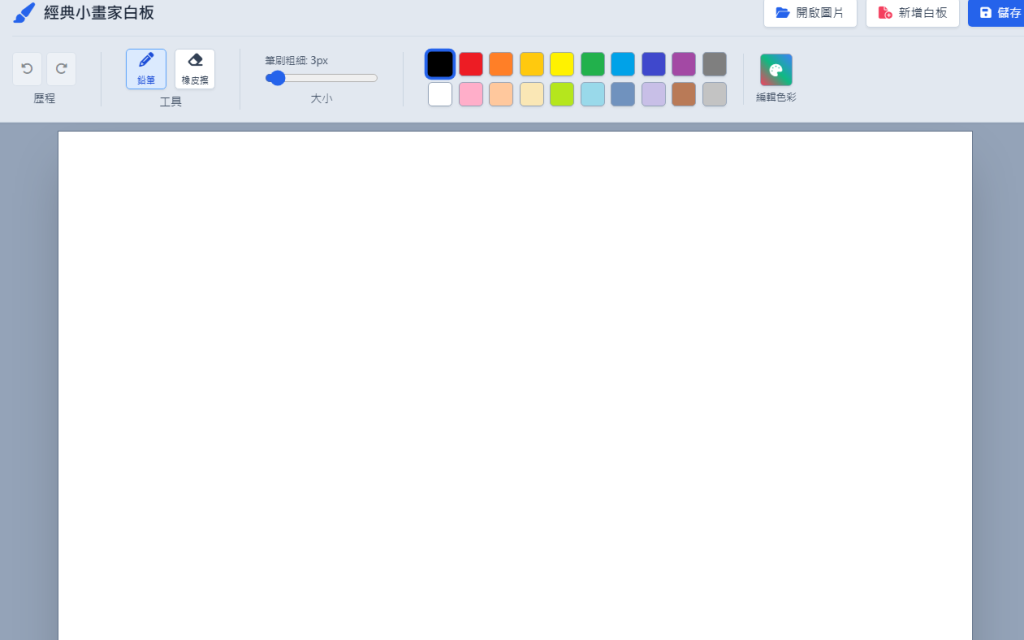
程式碼:
<!DOCTYPE html>
<html lang="zh-TW" class="h-full bg-slate-100">
<head>
<meta charset="UTF-8">
<meta name="viewport" content="width=device-width, initial-scale=1.0">
<title>經典小畫家白板</title>
<!-- Tailwind CSS CDN -->
<script src="https://cdn.tailwindcss.com"></script>
<!-- FontAwesome Icons -->
<link rel="stylesheet" href="https://cdnjs.cloudflare.com/ajax/libs/font-awesome/6.4.0/css/all.min.css">
<style>
/* 繪圖畫布預設為純白背景 */
#drawCanvas {
cursor: crosshair;
background-color: #ffffff;
touch-action: none;
}
</style>
</head>
<body class="h-full flex flex-col overflow-hidden font-sans select-none">
<!-- 頂部功能區 (Ribbon UI 樣式) -->
<header class="bg-slate-200 border-b border-slate-300 px-4 py-2 flex flex-col shadow-sm z-50">
<!-- 上方標題與檔案動作列 -->
<div class="flex items-center justify-between pb-2 border-b border-slate-300/60 mb-2">
<div class="flex items-center gap-2">
<i class="fa-solid fa-paintbrush text-xl text-blue-600"></i>
<h1 class="text-base font-bold text-slate-800 tracking-tight">經典小畫家白板</h1>
</div>
<div class="flex items-center gap-2">
<!-- 檔案上傳按鈕 (支援圖片上傳與編輯) -->
<label for="imageInput" class="cursor-pointer flex items-center gap-1.5 px-3 py-1.5 bg-white border border-slate-300 hover:bg-slate-50 text-slate-700 rounded text-xs font-medium shadow-sm transition">
<i class="fa-solid fa-folder-open text-blue-600"></i>
<span>開啟圖片</span>
</label>
<input type="file" id="imageInput" accept="image/*" class="hidden">
<button id="clearBtn" class="flex items-center gap-1.5 px-3 py-1.5 bg-white border border-slate-300 hover:bg-rose-50 hover:text-rose-600 text-slate-700 rounded text-xs font-medium shadow-sm transition">
<i class="fa-solid fa-file-circle-plus text-rose-500"></i>
<span>新增白板</span>
</button>
<button id="saveBtn" class="flex items-center gap-1.5 px-3 py-1.5 bg-blue-600 hover:bg-blue-700 text-white rounded text-xs font-medium shadow-sm transition">
<i class="fa-solid fa-floppy-disk"></i>
<span>儲存</span>
</button>
</div>
</div>
<!-- 仿 Ribbon 工具列面板 (精簡為鉛筆、橡皮擦、大小、色彩調色盤) -->
<div class="flex items-center gap-6 overflow-x-auto py-1 text-xs">
<!-- 影像群組 (復原/重做) -->
<div class="flex flex-col items-center border-r border-slate-300 pr-6">
<div class="flex gap-1 mb-1">
<button id="undoBtn" disabled title="復原" class="p-2 bg-white border border-slate-300 hover:bg-slate-100 rounded disabled:opacity-40"><i class="fa-solid fa-rotate-left"></i></button>
<button id="redoBtn" disabled title="重做" class="p-2 bg-white border border-slate-300 hover:bg-slate-100 rounded disabled:opacity-40"><i class="fa-solid fa-rotate-right"></i></button>
</div>
<span class="text-[11px] text-slate-600 font-medium">歷程</span>
</div>
<!-- 工具群組 (僅保留鉛筆與橡皮擦) -->
<div class="flex flex-col items-center border-r border-slate-300 pr-6">
<div class="flex gap-2 mb-1">
<button id="pencilTool" title="鉛筆/畫筆" class="tool-btn flex flex-col items-center justify-center w-10 h-10 bg-blue-100 border border-blue-400 text-blue-700 rounded shadow-sm">
<i class="fa-solid fa-pencil text-sm"></i>
<span class="text-[9px] mt-0.5">鉛筆</span>
</button>
<button id="eraserTool" title="橡皮擦" class="tool-btn flex flex-col items-center justify-center w-10 h-10 bg-white border border-slate-300 hover:bg-slate-100 text-slate-700 rounded shadow-sm">
<i class="fa-solid fa-eraser text-sm"></i>
<span class="text-[9px] mt-0.5">橡皮擦</span>
</button>
</div>
<span class="text-[11px] text-slate-600 font-medium">工具</span>
</div>
<!-- 大小粗細群組 -->
<div class="flex flex-col items-center border-r border-slate-300 pr-6">
<div class="flex flex-col justify-center h-full mb-1">
<label for="brushSize" class="text-[10px] text-slate-600 mb-0.5">筆刷粗細: <span id="sizeText" class="font-bold">3</span>px</label>
<input type="range" id="brushSize" min="1" max="40" value="3" class="w-28 accent-blue-600">
</div>
<span class="text-[11px] text-slate-600 font-medium">大小</span>
</div>
<!-- 色彩調色盤群組 (含當選取外框發亮提示) -->
<div class="flex items-center gap-4">
<!-- 顏色方格網 -->
<div class="grid grid-cols-10 gap-1.5" id="paletteGrid">
<!-- 顏色由 JavaScript 動態產生 -->
</div>
<!-- 自訂編輯色彩 -->
<div class="flex flex-col items-center pl-3 border-l border-slate-300">
<label for="customColor" class="cursor-pointer flex flex-col items-center">
<div class="w-8 h-8 rounded bg-gradient-to-tr from-rose-500 via-emerald-500 to-blue-500 border border-slate-400 shadow-sm flex items-center justify-center text-white text-xs">
<i class="fa-solid fa-palette"></i>
</div>
<span class="text-[10px] text-slate-600 mt-0.5">編輯色彩</span>
</label>
<input type="color" id="customColor" value="#000000" class="hidden">
</div>
</div>
</div>
</header>
<!-- 繪圖白板主區域 -->
<main class="flex-1 bg-slate-400 p-6 flex justify-center items-center overflow-auto">
<div class="bg-white shadow-2xl border border-slate-500 relative flex items-center justify-center" id="canvasWrapper">
<canvas id="drawCanvas" width="900" height="550"></canvas>
</div>
</main>
<!-- 底部狀態列 -->
<footer class="bg-slate-200 border-t border-slate-300 px-4 py-1 text-xs text-slate-600 flex justify-between items-center z-50">
<div id="statusInfo" class="flex items-center gap-4">
<span>畫布大小: 900 x 550 像素</span>
<span id="coordInfo">游標: 0, 0</span>
</div>
<div>
<span>經典小畫家白板 © 2026</span>
</div>
</footer>
<!-- JavaScript 繪圖邏輯 -->
<script>
const canvas = document.getElementById('drawCanvas');
const ctx = canvas.getContext('2d', { willReadFrequently: true });
const canvasWrapper = document.getElementById('canvasWrapper');
const imageInput = document.getElementById('imageInput');
// 控制元件
const pencilToolBtn = document.getElementById('pencilTool');
const eraserToolBtn = document.getElementById('eraserTool');
const brushSizeInput = document.getElementById('brushSize');
const sizeText = document.getElementById('sizeText');
const paletteGrid = document.getElementById('paletteGrid');
const customColorInput = document.getElementById('customColor');
const clearBtn = document.getElementById('clearBtn');
const undoBtn = document.getElementById('undoBtn');
const redoBtn = document.getElementById('redoBtn');
const saveBtn = document.getElementById('saveBtn');
const coordInfo = document.getElementById('coordInfo');
// 狀態變數
let currentTool = 'pencil'; // 'pencil', 'eraser'
let currentColor = '#000000';
let currentSize = 3;
let isDrawing = false;
let startX = 0, startY = 0;
let history = [];
let historyStep = -1;
// 初始化白板背景為白色
function initCanvasBackground() {
ctx.fillStyle = '#ffffff';
ctx.fillRect(0, 0, canvas.width, canvas.height);
saveState();
}
// 狀態管理 (復原/重做)
function saveState() {
historyStep++;
if (historyStep < history.length) {
history.length = historyStep;
}
history.push(canvas.toDataURL());
updateHistoryButtons();
}
function updateHistoryButtons() {
undoBtn.disabled = historyStep <= 0;
redoBtn.disabled = historyStep >= history.length - 1;
}
// 重新編排的色譜顏色順序
const colors = [
'#000000', '#ed1c24', '#ff7f27', '#ffc90e', '#fff200', '#22b14c', '#00a2e8', '#3f48cc', '#a349a4', '#7f7f7f',
'#ffffff', '#ffaec9', '#ffc89d', '#fae7b5', '#b5e61d', '#99d9ea', '#7092be', '#c8bfe7', '#b97a57', '#c3c3c3'
];
let colorButtons = [];
colors.forEach((hex) => {
const btn = document.createElement('button');
btn.className = 'w-6 h-6 rounded border border-slate-400 shadow-sm transition hover:scale-110 relative';
btn.style.backgroundColor = hex;
btn.addEventListener('click', () => {
currentColor = hex;
updateColorSelection(btn);
});
paletteGrid.appendChild(btn);
colorButtons.push({ btn, hex });
});
// 更新調色盤選取外框提示
function updateColorSelection(selectedBtn) {
colorButtons.forEach(item => {
item.btn.classList.remove('ring-2', 'ring-blue-600', 'scale-110', 'z-10');
item.btn.style.borderColor = '#94a3b8';
});
if (selectedBtn) {
selectedBtn.classList.add('ring-2', 'ring-blue-600', 'scale-110', 'z-10');
selectedBtn.style.borderColor = '#2563eb';
}
}
// 預設選中第一個黑色
if (colorButtons.length > 0) {
updateColorSelection(colorButtons[0].btn);
}
customColorInput.addEventListener('input', (e) => {
currentColor = e.target.value;
updateColorSelection(null);
});
// 工具切換
const allToolBtns = [pencilToolBtn, eraserToolBtn];
function setActiveTool(selectedBtn, toolName) {
allToolBtns.forEach(btn => {
btn.classList.remove('bg-blue-100', 'border-blue-400', 'text-blue-700');
btn.classList.add('bg-white', 'border-slate-300', 'text-slate-700');
});
selectedBtn.classList.remove('bg-white', 'border-slate-300', 'text-slate-700');
selectedBtn.classList.add('bg-blue-100', 'border-blue-400', 'text-blue-700');
currentTool = toolName;
canvas.style.cursor = toolName === 'eraser' ? 'cell' : 'crosshair';
}
pencilToolBtn.addEventListener('click', () => setActiveTool(pencilToolBtn, 'pencil'));
eraserToolBtn.addEventListener('click', () => setActiveTool(eraserToolBtn, 'eraser'));
brushSizeInput.addEventListener('input', (e) => {
currentSize = parseInt(e.target.value);
sizeText.textContent = currentSize;
});
// 取得畫布相對座標
function getMousePos(e) {
const rect = canvas.getBoundingClientRect();
return {
x: Math.floor(e.clientX - rect.left),
y: Math.floor(e.clientY - rect.top)
};
}
// 繪圖事件監聽
canvas.addEventListener('mousedown', (e) => {
const pos = getMousePos(e);
startX = pos.x;
startY = pos.y;
isDrawing = true;
ctx.beginPath();
ctx.moveTo(startX, startY);
});
canvas.addEventListener('mousemove', (e) => {
const pos = getMousePos(e);
coordInfo.textContent = `游標: ${pos.x}, ${pos.y}`;
if (!isDrawing) return;
ctx.strokeStyle = currentTool === 'eraser' ? '#ffffff' : currentColor;
ctx.lineWidth = currentSize;
ctx.lineCap = 'round';
ctx.lineJoin = 'round';
ctx.lineTo(pos.x, pos.y);
ctx.stroke();
});
canvas.addEventListener('mouseup', () => {
if (isDrawing) {
isDrawing = false;
saveState();
}
});
canvas.addEventListener('mouseleave', () => {
if (isDrawing) {
isDrawing = false;
saveState();
}
});
// 圖片上傳功能
imageInput.addEventListener('change', (e) => {
const file = e.target.files[0];
if (!file) return;
const reader = new FileReader();
reader.onload = function(event) {
const img = new Image();
img.onload = function() {
ctx.fillStyle = '#ffffff';
ctx.fillRect(0, 0, canvas.width, canvas.height);
let w = img.width;
let h = img.height;
if (w > canvas.width || h > canvas.height) {
const ratio = Math.min(canvas.width / w, canvas.height / h);
w *= ratio;
h *= ratio;
}
const x = (canvas.width - w) / 2;
const y = (canvas.height - h) / 2;
ctx.drawImage(img, x, y, w, h);
saveState();
}
img.src = event.target.result;
}
reader.readAsDataURL(file);
});
// 新增白板
clearBtn.addEventListener('click', () => {
ctx.fillStyle = '#ffffff';
ctx.fillRect(0, 0, canvas.width, canvas.height);
saveState();
});
// 復原與重做
undoBtn.addEventListener('click', () => {
if (historyStep > 0) {
historyStep--;
let img = new Image();
img.src = history[historyStep];
img.onload = () => {
ctx.clearRect(0, 0, canvas.width, canvas.height);
ctx.drawImage(img, 0, 0);
updateHistoryButtons();
}
}
});
redoBtn.addEventListener('click', () => {
if (historyStep < history.length - 1) {
historyStep++;
let img = new Image();
img.src = history[historyStep];
img.onload = () => {
ctx.clearRect(0, 0, canvas.width, canvas.height);
ctx.drawImage(img, 0, 0);
updateHistoryButtons();
}
}
});
// 儲存圖片
saveBtn.addEventListener('click', () => {
const link = document.createElement('a');
link.download = 'paint-drawing.png';
link.href = canvas.toDataURL();
link.click();
});
// 初始化
initCanvasBackground();
</script>
</body>
</html>

 liqincheng

 iThome鐵人賽
 看影片追技術